Hello CG!
#55 Legend What a fun contest! 
Congratulations to the CC team for this wonderful game, good balance between Heuristics/Sim (Macro/Micro respectively). Simple rules to jump into, somewhat like a Tower Defense game with RTS elements. Pretty pleasant graphics too (peaceful, not too distracting, does the job of visualization well)!
Like many, my bot was a mix of heuristics/simulation, and in my case more of simulation-informed heuristics than a search-based bot.
Macro
Main aspect of Macro strategy was what structure should each site have? In order to make these decisions, my bot took into consideration what the structure types on adjacent sites are and how far away the sites are from enemy tower/barracks. Since we don’t have a clear adjacency list, we precompute it at the start of each game.
Delaunay Triangulation
What this algo does is avoid having points within the circumcircle of each triangle. Usually applied to automatically generate a mesh from a set of points (3D-modelling), but useful here to give us a set of adjacency lists.
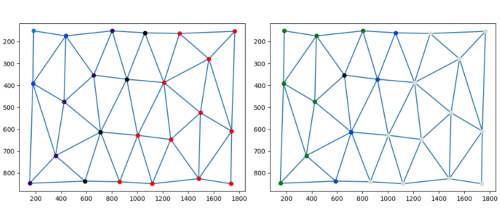
Implementation and usage in python is super convinient with scipy 
import numpy as np
from scipy.spatial import Delaunay
points = np.array(samples)  #[[100, 200], ...] List of site co-ordinates
tri = Delaunay(points)
print(tri.simplices)        #[[0, 1, 2], ...] Gives the vertices of each triangle
With this information, my bot tries to construct a barrier of towers and place mines behind towers away from the enemy. (Blue->Tower, Green->Mines, Black->Barracks)
To select the initial barracks position I set a limit on how far I should propagate outwards from my initial site (based on starting health, lower->closer) and from these sites, simulate a single knight pathing towards enemy queen and pick the one with the shortest distance.
Micro
With the simplier collision algorithm the referee uses in this contest, I had hopes python would be able to simulate fast enough to be useful. Still, I needed to do some optimisations before it was anywhere near usable.
Some numbers in python (simulating movement of 2 groups of 4 knights heading towards respective queens averaged across 40 turns right after spawning):
-
[146ms] Straight-up implementation of referee collision (removing site-site checking).
- Python is slooow…
- Class access is pretty costly in python (using the ‘.’)
-
[13.7ms] Pre-loading of class data into arrays, operating on the local array and updating at the end of the simulation.
- Accessing data from local arrays is *10 faster!
-
[2.58ms] Sectoring optimisation
- Many objects are simply too far away to be even considered for collision, by precomputing a grid of possible locations where collisions may take place, we reduce the time used for collision checking further.
Sectoring Optimisation
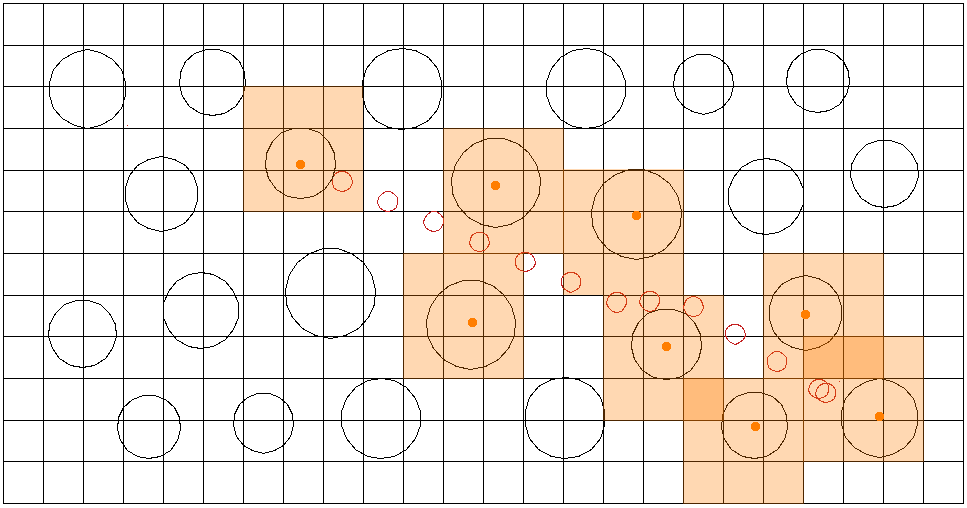
We split up the map into grids (in this case a 24x12 grid) and precompute an occupancy lookup table (ids of objects that occupy the grid). To account for border cases (not yet into the next grid so I do not ‘see’ the object there), each object will test for collision with other objects within a 3x3 grid. This hugely reduces the collision search-space when there’re numerous objects in play but in separate regions.
Sites can be precomputed once but units move so their ‘affected grids’ will have to be computed each turn then used for the turn’s collision checking.
Now with under 3ms per turn collision simulation with 10 moving objects, it starts to be useful for my queen to assess when it will come under attack by enemy knights.
Alas I only managed to finish the simulation engine on the second last day of the contest and didn’t manage to implement much micro dodging/evaluation of moves after simulating the results. My bot’s dodging was its greatest weakness. All I did was simulate if my queen will get attacked prior to completing her goal and choose another goal/run away (and the running away was really just running directly away haha).
Python Graphics Library
My main gripe with CodinGame bot programming contests is how hard it is to debug visually. By simply drawing some lines and labels overlayed onto the game (could be a debug toggle option), it will tell you much about how your bot is making its decisions and where your bugs may be. So for Mad Max I used the default python turtle library to debug my simulation. This time, I used the same base code to write the sim. It’s a short 300 lines in python (including my own implementation of Point and Vector classes for linear algebra - useful for physics) that I’d like to share with you guys, if you need a quick way of making visualisations for your bot, feel free to use it 
Till next time Code Of Kutulu!